
What Is Higgsfield AI? How the AI Video Platform Works
Creating video used to require expensive software, hours of editing and a lot of trial and error. Higgsfield AI was built to remove that barrier — it turns text, images or simple sketches into finished cinematic video without any technical skill.
This is the background explainer: what Higgsfield AI is, who built it, how the platform actually works, and who it suits. It deliberately avoids plan prices and credit counts, because those change several times a year on this platform and any number printed here would be wrong within months.
Current pricing and 2026 updates: Higgsfield AI Supercomputer, $5.4B Raise and 2026 Pricing — the up-to-date guide covering the Supercomputer agent, the restructured plans, what the free tier actually gives you now, and how MCP credits work.
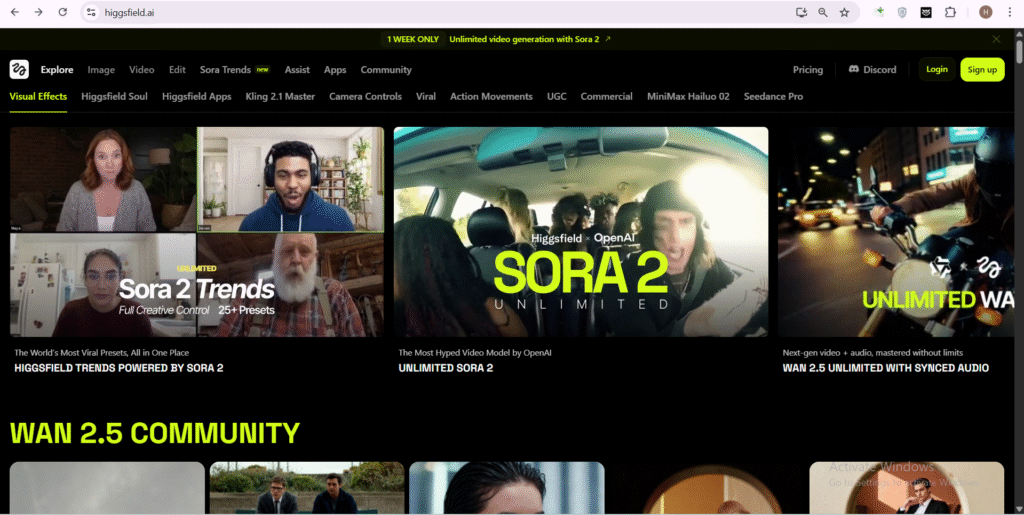
What Is Higgsfield AI?
Higgsfield AI is a generative media platform. You give it a prompt, a still image or a rough sketch, and it produces video or images from that input. What separates it from a plain text-to-video box is directorial control — you choose the camera movement, the style and the effect rather than accepting whatever the model decides.
The design goal has been consistent since launch: make the output feel authored rather than generated. You guide the process instead of pressing a button and hoping.
Who Built Higgsfield AI
Higgsfield AI was founded in 2023 by Alex Mashrabov, previously head of generative AI at Snap, where he worked on the company's AR and generative features before leaving to start Higgsfield.
His stated aim was to make video creation accessible to people who are not professional editors — musicians, small brands, social storytellers — rather than building another tool aimed at studios that already have production budgets.
The platform has grown quickly since, raising several funding rounds and expanding well beyond its original text-to-video feature set.
How Higgsfield AI Works
The key thing to understand is that Higgsfield AI is not a single model. It is an aggregation layer. The company runs some of its own generation engines, and it routes the rest of your requests to third-party models it has integrated.
That architecture has one large consequence: the available model list changes constantly. Engines that lead on motion quality one quarter get replaced the next. Rather than betting on one model, Higgsfield bets on being the place where whichever model currently wins is available.
It also means output quality is not really a property of "Higgsfield" as such — it depends on which engine you pick for a given job. Two videos made on the same account can look like they came from different products.
If you want to understand the individual engines this kind of platform routes to, our breakdowns of Seedance 2.0 and 2.5 and Kling AI cover what each one is actually good at.
The Core Creative Features
Click-to-Video and Draw-to-Video: the two entry points. Type a description or sketch a rough composition, and the platform builds a clip from it. The sketch route is the more distinctive one — it lets you fix framing before generation rather than re-prompting until the composition happens to land.
Camera and motion controls: dolly zooms, arcs, whip pans and similar moves are exposed as explicit options. This is the feature most responsible for the platform's reputation — it is what makes output read as directed rather than drifting.
Higgsfield Soul: the in-house image engine, aimed at people, fashion and editorial-style stills, with style presets and character-consistency tools so the same face survives across a set of images.
Visual effects: a library of cinematic effects — explosions, transformations, transitions — applied as presets rather than assembled manually.
Who Higgsfield AI Is For
The platform fits three groups particularly well:
- Music video and short-form directors who want stylised, camera-driven visuals without a shoot.
- Small brands and marketers producing ad creative in volume across multiple formats.
- Social storytellers who need a high output rate and cannot maintain a full editing pipeline.
It fits less well if you need frame-accurate editorial control, long-form continuity across many minutes, or a genuinely free tool. On that last point in particular, expectations should be set carefully — see the section below.
What Higgsfield AI Does Not Do
It is not a free tool in any meaningful sense. Free access on this platform has historically meant limited or watermarked trial output, and the terms have been tightened more than once. Anything you intend to publish commercially will require a paid plan, and free output generally does not carry commercial rights.
It is not a replacement for an editor. Generated clips still need assembly, timing and sound design. Higgsfield produces shots, not finished films.
Long-form consistency remains hard. Character and scene continuity across many shots is improving but is still the weak point of every generative video tool, this one included.
Pricing moves frequently. Plan names, credit allowances and the shape of the free tier have all been restructured repeatedly. Our 2026 Higgsfield AI pricing and Supercomputer guide tracks the current numbers, but always confirm on the official Higgsfield pricing page before subscribing.
Open-weight alternatives are worth knowing about if you would rather run things locally than subscribe — our guide to AI video generation with WAN 2.2 covers that path, and there is more across the AI category.
Frequently Asked Questions
What is Higgsfield AI in simple terms?
It is a platform that turns text prompts, images or sketches into video and images, with explicit control over camera movement and style. Unlike a single AI model, it gives you access to many generation engines through one interface.
Who founded Higgsfield AI?
Alex Mashrabov founded Higgsfield AI in 2023. He was previously head of generative AI at Snap, and started the company to make video creation accessible to people without editing or production experience.
Is Higgsfield AI good for beginners?
Yes. The Click-to-Video and Draw-to-Video entry points require no editing knowledge, and camera moves are selected from presets rather than configured manually. The learning curve is in knowing which generation engine suits which job.
Does Higgsfield AI use its own model?
Partly. It runs in-house engines such as Higgsfield Soul for images, but much of its video generation routes to integrated third-party models. The available lineup changes regularly as newer engines are added.
What is Draw-to-Video?
Draw-to-Video lets you sketch a rough composition and have the platform generate a clip based on that layout. It is useful when you know the framing you want and do not want to re-prompt repeatedly to get it.
Can Higgsfield AI replace a video editor?
No. It generates individual shots. Assembling those into a finished piece — timing, sequencing, sound design and colour — still requires an editing step. It removes the shoot, not the edit.
What is Higgsfield Soul used for?
Soul is the platform's image engine, built for people, fashion and editorial-style stills. Its character-consistency feature keeps the same subject recognisable across a series of images, which is a common weak point in AI image generation.

Sia is the co-founder of Corenexis and one of the earliest voices shaping its editorial direction. With years of hands-on experience covering AI and technology, she has been writing about the digital world long before it became everyone's favorite topic — and she still does it better than most.
View all posts by Sia →
5 Comments
I love how Higgsfield AI focuses on empowering creators with control over their videos. It’s exciting to see a tool that brings professional-quality content to everyone, regardless of their technical background!
Let me gush about Seedream 4.0 for a sec—its 3D content and batch editing features are chef’s kiss. I work on training materials for my team, and being able to generate a bunch of on-brand diagrams at once (all 4K, no blurriness!) cut my prep time in half. It actually listens to your prompts too—no more “close but not quite” results.
<p>Absolutely agree — tools like Higgsfield AI are truly democratizing content creation.</p>
<p>Impressive! Tools that truly understand context and maintain visual consistency are a huge win for content creators.</p>
It’s refreshing to see an AI tool designed with creativity and control at its core, rather than just automation. Higgsfield AI seems like it could really empower storytellers who want to bring their vision to life without the usual barriers of complex software. The fact that it’s built by someone with Snapchat’s AI background adds credibility to its potential impact.
Community guidelines
We want the comments to be useful for every reader. Every comment is reviewed before it is published. A comment will not be approved if it is:
Keep it genuine and on-topic and it will be approved quickly. Thank you for helping keep the discussion clean.