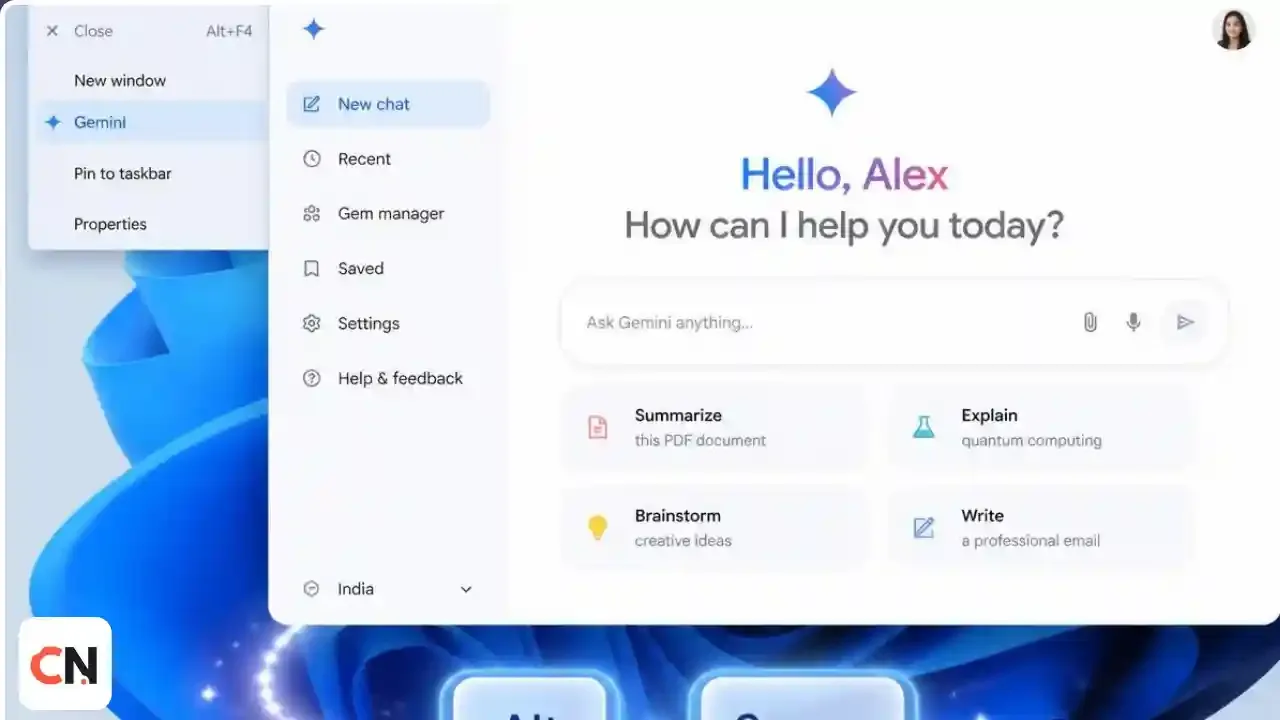
Gemini App for Windows: How to Download It, What It Does and What Needs a Paid Plan
Before you start
Download page: gemini.google/desktop
Open it anywhere: press Alt + Space
Works on: Windows 10 and 11, according to Google's Workspace update
Free or paid? The basic app works with a Google account. Gemini Spark and video creation need a Google AI subscription.
Google has released a dedicated Gemini app for Windows, so you no longer need to keep a browser tab open to use it. It arrived about five months after the Mac version, according to Thurrott. Here is how to get it, what is inside and where the limits are.
How to download and install
- Go to gemini.google/desktop in your browser.
- Download the Windows installer and run it.
- Sign in with your Google account.
- Press Alt + Space from any app to open Gemini on top of your work.
Google's Workspace update says no extra setup is needed. It is available to users with personal Google accounts, Workspace Individual subscribers and all Google Workspace customers.
Which Windows versions are supported?
Google's Workspace update says the app is available for Windows 10 and 11. Some news coverage mentions only Windows 11, so if you are on Windows 10, check the download page for the current requirement before installing.
What can the Gemini Windows app do?
- Quick access with Alt + Space. It opens over whatever you are doing. You can pick from preset shortcuts or set your own.
- Google apps in one place. It can draft something like a project summary using your Gmail and Google Drive.
- Image creation. Nano Banana is built in for image generation.
- A full sidebar. Chat history, Daily Brief, image and video creation, document libraries, notebooks and your recent creations are in one place.
- Light on your PC. Google's product management director Erin Pettigrew describes it as "lightweight and quiet" and says it should not hurt performance. That is Google's claim, not our test.
What needs a paid plan?
Some advanced features need a Google AI subscription and are limited to users aged 18 and over.
| Feature | Free Google account | Google AI subscription |
|---|---|---|
| Chat and Alt + Space access | Yes | Yes |
| Image creation with Nano Banana | Yes | Yes |
| Video creation with Gemini Omni | No | Yes |
| Gemini Spark personal agent | No | Yes |
Availability of some features also varies by region.
Gemini app vs using Gemini in a browser
The app saves you a tab and gives you a global shortcut. The web version is still the easiest choice if you are on a shared or work computer where you cannot install software. If you like working from a terminal instead, our guide to Gemini CLI covers Google's command line agent.
For workplaces and admins
Google says the app is on by default for all organizations that have Gemini enabled, and admins can turn it off in the Generative AI settings of the Workspace Admin console. The rollout reached both Rapid Release and Scheduled Release domains on September 11, 2026. Google also says this is the beginning of native desktop features for Windows, with more to come.
Latest Updates
- September 11, 2026: The Gemini desktop app reaches Rapid Release and Scheduled Release Workspace domains, on by default.
- September 10, 2026: Google announces the Gemini app for Windows with the Alt + Space shortcut.
We will update this guide as Google adds features.
FAQ
Is the Gemini app for Windows free?
Yes for basic use with a Google account. Gemini Spark and Gemini Omni video creation need a Google AI subscription.
What is the Gemini keyboard shortcut on Windows?
Alt + Space by default. You can switch to a preset alternative or set a custom shortcut.
Does it work on Windows 10?
Google's Workspace update says Windows 10 and 11. Other reports mention Windows 11 only, so check the download page.
Is it safe to download?
Download it only from gemini.google/desktop, which Google lists as the official page.
Does the Gemini app slow down my PC?
Google says it is lightweight and quiet. We have not benchmarked it.
Can my company block it?
Yes. Workspace admins can disable it from the Generative AI settings in the Admin console.

Sia is the co-founder of Corenexis and one of the earliest voices shaping its editorial direction. With years of hands-on experience covering AI and technology, she has been writing about the digital world long before it became everyone's favorite topic — and she still does it better than most.
View all posts by Sia →

0 Comments
Community guidelines
We want the comments to be useful for every reader. Every comment is reviewed before it is published. A comment will not be approved if it is:
Keep it genuine and on-topic and it will be approved quickly. Thank you for helping keep the discussion clean.