Cursor vs GitHub Copilot vs Claude Code: Which One Should You Pay For?
Pick by situation (read this, then skip to the section you need)
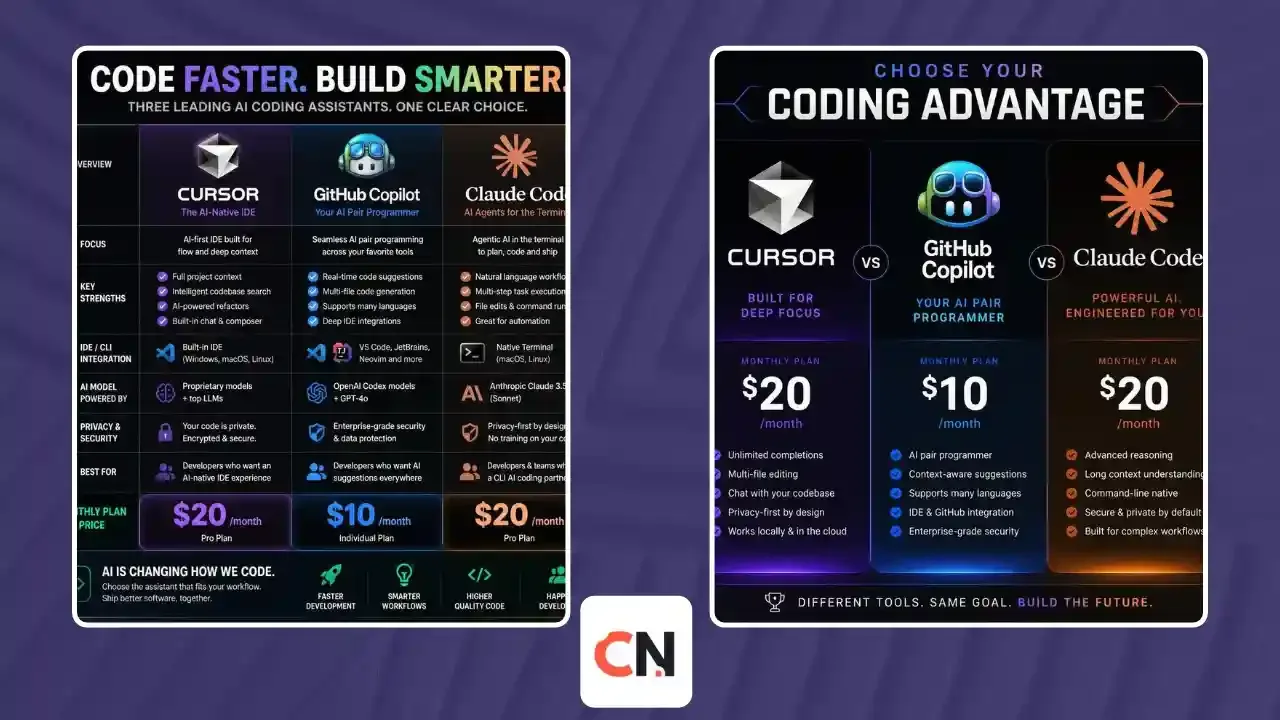
Want the cheapest paid start, inside the editor you already use? GitHub Copilot Pro at $10 a month.
Want an AI-first editor with a strong agent? Cursor Pro at $20 a month.
Want an agent that works from your terminal and across your whole repo? Claude Code, included with Claude Pro at $20 a month.
Not sure? Start with the free tier of Copilot or Cursor, then add one paid plan only when you hit a real limit.
These three tools get compared as if they do the same job, but they come from different directions. Cursor is built around an editor, GitHub Copilot sits inside the tools and platform you already use, and Claude Code is an agent you drive mostly from the terminal. This guide compares them on price, features and limits using the official pages checked on October 6, 2026.
What each tool is
Cursor describes itself as a coding agent for building ambitious software. It has an Agent mode with a Plan Mode for bigger tasks, a Tab completion feature, its own Composer model, Cloud Agents that run outside the editor, and Bugbot for automated bug detection.
GitHub Copilot is the broadest of the three. It covers chat, inline suggestions and next edit suggestions, plus agentic parts such as a Copilot CLI, a desktop Copilot app, a cloud agent that creates code changes, code review and agent mode inside IDEs. It works in VS Code, Xcode, Eclipse, JetBrains IDEs, Windows Terminal and GitHub.com.
Claude Code is an agentic coding tool that reads your codebase, edits files, runs commands and connects to your dev tools. It runs in the terminal, in VS Code and JetBrains, in a desktop app and in the browser, and all of these share the same engine, so your CLAUDE.md rules and MCP settings carry across.
Pricing compared (individual plans)
| Plan level | Cursor | GitHub Copilot | Claude Code (via Claude) |
|---|---|---|---|
| Free | Hobby: limited Agent requests | Free: 2,000 completions a month plus a credits allowance | Not listed on the Free plan |
| Entry paid | Pro: $20 a month | Pro: $10 a month (1,500 AI credits) | Pro: $20 a month ($17 on annual billing) |
| Mid | Pro Plus: $60 a month | Pro+: $39 a month (7,000 AI credits) | Max from $100 a month (5x or 20x Pro usage) |
| Top | Ultra: $200 a month | Max: $100 a month (20,000 AI credits) | Max 20x tier |
| Students | Not listed | Free for verified students | Education plans for institutions |
For teams, Cursor Teams is $40 per user a month (Premium is $120 with 5x Agent limits), Copilot Business is $19 per seat and Enterprise is $39 per seat, and Claude Team standard seats are $20 per seat on annual billing or $25 monthly (Premium seats $100 or $125).
Features compared
| Feature | Cursor | GitHub Copilot | Claude Code |
|---|---|---|---|
| Works mainly in | Its own editor and CLI | Your existing IDE, CLI, GitHub.com | Terminal, IDE extensions, desktop, web |
| Autocomplete | Unlimited Tab completions on paid plans | Unlimited on paid plans | Not its focus |
| Agent mode | Yes, with Plan Mode | Yes, inside IDEs | Core of the product |
| Cloud or background agents | Cloud Agents | Cloud agent | Web sessions and routines |
| Code review | Bugbot | Copilot code review | GitHub Actions and code review integration |
| MCP support | Yes | Yes | Yes |
| Custom rules | Rules system | Custom instructions and prompt files | CLAUDE.md, skills and hooks |
| Parallel agents | Background agents | Custom agents | Subagents and background agents |
How usage limits really work
The sticker price is only half the story, and each company counts usage differently.
- Cursor includes extended agent usage on paid plans, and when you go over you can keep working at the same API rates through on-demand billing. Cursor's own docs say daily Agent users typically spend $60 to $100 a month in total.
- GitHub Copilot moved to AI credits. Code completions and next edit suggestions stay unlimited and unbilled on paid plans, while chat and agent work use the monthly credits, so heavy agent users can go through the $10 plan quickly.
- Claude Code is covered by your Claude plan. Claude says all plans share usage limits that reset on rolling 5-hour windows plus weekly caps, so a long agent session can use a large share of your window.
If you only ask for autocomplete, Copilot is the cheapest. If you run agents all day, budget for the mid or top tiers of whichever tool you choose.
Which one should you pick?
- Beginners and students: Start with Copilot. It is free for verified students and has a free plan for everyone else.
- Freelancers who live in one editor: Cursor Pro is a clean single-tool setup with autocomplete and agent in one place.
- Developers who work in the terminal or on large refactors: Claude Code fits best because it plans, edits many files and runs commands from the command line.
- Teams already on GitHub: Copilot Business at $19 per seat is the easiest to roll out, since it plugs into the platform your team already uses.
- Heavy agent users: Compare the $100 tiers (Copilot Max, Claude Max) and Cursor's $60 to $200 range against your real monthly usage before committing.
Can you use more than one?
Yes, and many developers do. Claude Code has an extension that installs into both VS Code and Cursor, so you can keep Cursor's editor and still call Claude Code inside it. A common combination is Copilot Pro for cheap autocomplete plus one agent tool for heavier jobs. Check the total, though: Copilot Pro ($10) plus Claude Pro ($20) comes to $30 a month.
If you want to see how Claude Code stacks up against another terminal agent, read our Claude Code vs Codex CLI comparison. New to Claude Code? Our fixes for the Claude Code command not found error and the Ralph Wiggum loop guide cover the common first steps. For GitHub's model side, see our post on the GitHub Copilot open-weight model.
Latest Updates
- October 6, 2026: Prices in this guide were checked against the official Cursor, GitHub Copilot and Claude pricing pages and docs on this date.
- GitHub Copilot: Plans now run on monthly AI credits, with a Max tier at $100 a month (20,000 credits) added above Pro+.
- Cursor: Individual plans are Pro ($20), Pro Plus ($60) and Ultra ($200), and an India-only Start plan is listed at ₹649 a month.
- Claude: Claude Code is part of the Pro plan at $20 a month ($17 on annual billing), with Max plans from $100 a month.
We will update this section when any of the three changes its plans.
FAQ
Which is better, Cursor or GitHub Copilot?
Cursor is stronger if you want an editor built around an agent. Copilot is cheaper and works across many IDEs. For autocomplete only, Copilot Pro at $10 is the better value.
Is Claude Code better than Cursor?
They solve different problems. Claude Code is an agent that works from the terminal and across a repo, while Cursor is an editor with an agent inside it. Many developers pair them.
Is GitHub Copilot free?
There is a free plan with 2,000 inline completions a month and a limited credits allowance. Verified students get Copilot Student at no cost with full feature access.
Does Claude Code need a paid plan?
Claude's pricing page lists Claude Code from the Pro plan upward, and the Claude Code docs say most surfaces need a Claude subscription or an Anthropic Console account.
Can I use Claude Code inside Cursor?
Yes. The Claude Code extension can be installed in Cursor as well as in VS Code.
Which tool is cheapest for a team?
Copilot Business at $19 per seat is the lowest of the three team entry prices, against $40 for Cursor Teams and $20 to $25 for Claude Team standard seats.
What about pricing in India?
Cursor lists a Start plan at ₹649 a month for India. Check each vendor's checkout for local pricing and taxes, as the numbers above are in US dollars.

Sia is the co-founder of Corenexis and one of the earliest voices shaping its editorial direction. With years of hands-on experience covering AI and technology, she has been writing about the digital world long before it became everyone's favorite topic — and she still does it better than most.
View all posts by Sia →
0 Comments
Community guidelines
We want the comments to be useful for every reader. Every comment is reviewed before it is published. A comment will not be approved if it is:
Keep it genuine and on-topic and it will be approved quickly. Thank you for helping keep the discussion clean.