How to Turn Off the Firefox Nova Design (and Other Firefox 157 Changes)
Quick fix, no reading needed
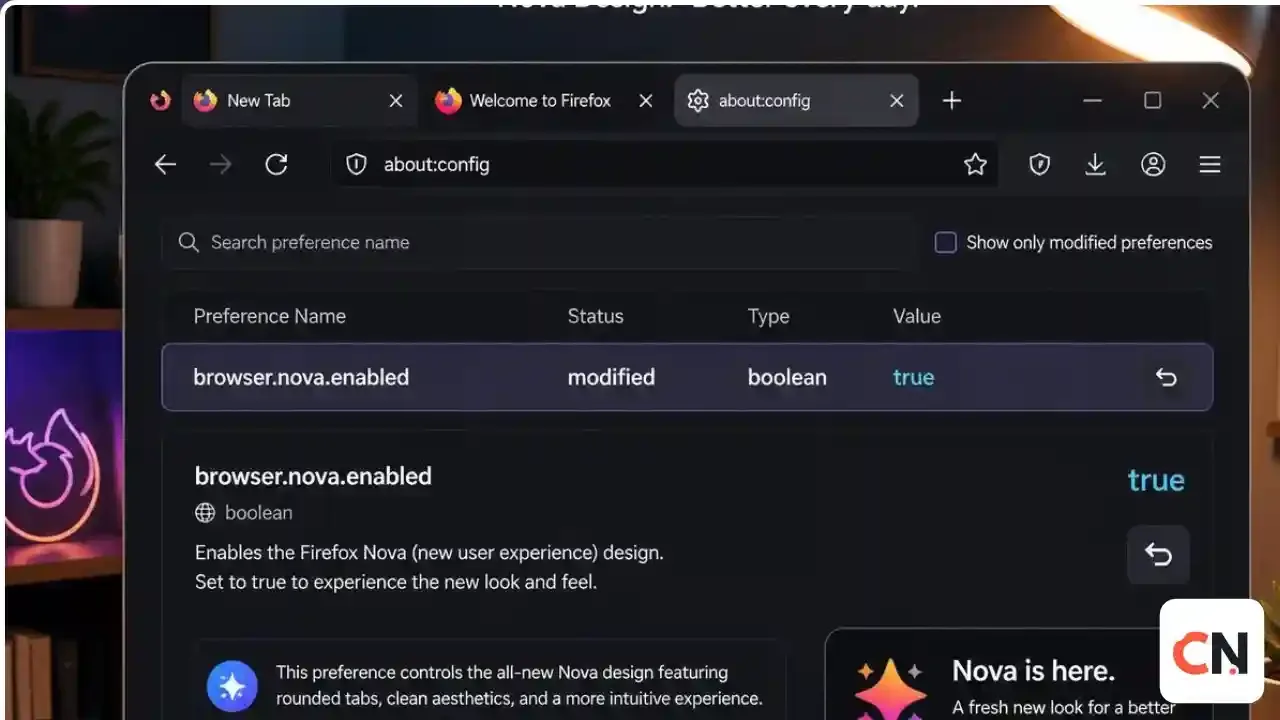
Typeabout:configin the address bar, accept the warning, search forbrowser.nova.enabled, set it to false, and restart Firefox if the old look does not return.
If your Firefox suddenly looks rounder and softer, you are not imagining it. Firefox 157 brought the Nova redesign, which Mozilla's own coverage calls the biggest visual refresh in years. Not everyone wants it, so here is what changed, how to switch back, and what else came with the update.
What is Firefox Nova?
Nova is a new look for the browser. Tabs, menus, the address bar and search boxes are rounder, with a subtle gradient on the active tab that adds some warmth. The settings page now uses rounded cards, and the New Tab page, toolbars and Private Browsing mode got refreshed colors and icons. Earlier test builds showed "floating islands" gaps around interface elements, but OMG! Ubuntu reports those were removed before the stable release.
When did it arrive?
Firefox 157 was available on September 28, 2026, with the full rollout to existing users starting September 29, 2026. It is on Mozilla's website and, for Debian based Linux systems, in the APT repository. Other Linux distributions such as Ubuntu and Fedora should get it through normal updates.
How to turn off Nova
- Open Firefox and type
about:configin the address bar, then press Enter. - Click to accept the warning.
- In the search box, type
browser.nova.enabled. - Click the toggle so the value shows false.
- Restart Firefox if the old look does not appear right away.
To bring Nova back, set the same preference to true.
Keep in mind that about:config options are meant for testing and Mozilla can remove them in a later release, so this switch may not work forever.
The compact mode is back
One change many people will like: Firefox has reintroduced a compact mode that shrinks spacing in toolbars and tabs. It is meant for small screens and split screen layouts, and there is an auto setting that adapts to your window. Standard and touch modes are still available. You will find the density choice in Firefox's settings, in the appearance area.
Better Tab Groups
Tab Groups, which arrived in Firefox 138, now sit more naturally in the tab bar, and switching or collapsing a group is smoother. The "List all tabs" button also has a new, clearer icon.
Other changes in Firefox 157
- TLS key logging warning: Firefox now alerts you when encryption keys are being logged.
- New Tab shortcuts: a visible "+" icon makes it easier to add your own shortcuts.
- Hardware AV1 decoding: WebRTC video calls can use supported hardware.
- Firefox Suggests: sponsored suggestions in the address bar are available in select European countries.
- Amazon removed: it is no longer one of the default search engines.
Should you keep Nova?
If you like a modern look and you want the compact mode, try it for a few days. If it slows you down or you simply dislike the rounded style, the about:config switch gives you the old layout back. If you prefer a different browser altogether, see our guide on the Chrome zero-day update to keep Chrome patched.
Latest Updates
- September 29, 2026: Firefox 157 rolls out to existing users with the Nova design on by default.
- September 28, 2026: Firefox 157 becomes available for download.
We will update this guide if Mozilla changes or removes the Nova switch.
FAQ
How do I get the old Firefox design back?
browser.nova.enabled to false in about:config and restart Firefox if needed.Is Nova a setting in the normal Firefox menu?
about:config preference.Does Nova slow Firefox down?
Is the compact mode back for good?
Does Firefox 157 work on Linux?
Is Firefox 157 safe to install?

Sia is the co-founder of Corenexis and one of the earliest voices shaping its editorial direction. With years of hands-on experience covering AI and technology, she has been writing about the digital world long before it became everyone's favorite topic — and she still does it better than most.
View all posts by Sia →


0 Comments
Community guidelines
We want the comments to be useful for every reader. Every comment is reviewed before it is published. A comment will not be approved if it is:
Keep it genuine and on-topic and it will be approved quickly. Thank you for helping keep the discussion clean.