
Gemini AI Prompt Trend: Create Durga Mata Art
AI-generated art is taking the world by storm, and Gemini AI has become a powerful tool for creating incredible visuals. With this platform, users can now generate hyper-realistic, creative images of Durga Mata—whether in traditional style, cinematic visuals, or fully imaginative 3D/4D/5D/6D scenes.
In this article, we provide a step-by-step guide on how to use Gemini AI prompts for Durga Mata, along with tips to customize every detail for a perfect divine image.
Step-by-Step Guide to Using Prompts in Gemini AI
Step 1: Upload a Reference Image
- If you want to base your image on a specific pose, face, or concept, upload a reference photo.
- If you prefer a fully imaginative image, you can skip this step.
Step 2: Choose a Prompt
- Use pre-written high-quality prompts (Divine Realism, Epic Battle, Peaceful Blessings, Nighttime Glow, Festival Celebration).
- Customize pose, saree color, background, or mood according to your preference.
Read Also: Create Polaroid-Style Photos with Gemini AI Easily
Step 3: Select Style and Dimension
- Gemini AI allows styles like 3D, 4D, 5D, 6D, cinematic, ultra-realistic.
- Each style changes the look and depth of the image:
- 3D/4D – realistic textures and depth
- 5D/6D – surreal, dynamic, cinematic effects
Step 4: Adjust Lighting & Mood
- Include terms like “golden glow”, “divine aura”, “cinematic lighting” in your prompt.
- This gives your image a heavenly, dreamy, and vibrant appearance.
Read Also: 21 Stunning Transformations Using Gemini Native Editing
Step 5: Generate in 4K
- Always select 4K resolution for crisp, high-quality results.
- If the AI result is slightly off, tweak your prompt and re-generate.
Step 6: Download and Share
- Once the image is generated, download it.
- Use it for social media, blogs, personal projects, or creative displays.
Here are the some prompt that must try to create an image of Durga Mata
Prompt 1 – Divine Realism (4K)
"Use the uploaded reference image to create a 4K ultra-realistic image of Durga Mata. She should be seated on a majestic lion, wearing a vibrant red and gold saree with intricate embroidery. Maintain the pose and facial features from the uploaded image, but transform the scene into a divine, radiant, and dreamy atmosphere, as if she is blessing devotees. Her expression should be serene and powerful. Add a soft, glowing golden aura in the background, with cinematic lighting, rich textures on her clothing and ornaments, and a warm, heavenly vibe. Include 3D, 4D, 5D, or cinematic style enhancements for a hyper-realistic final image."
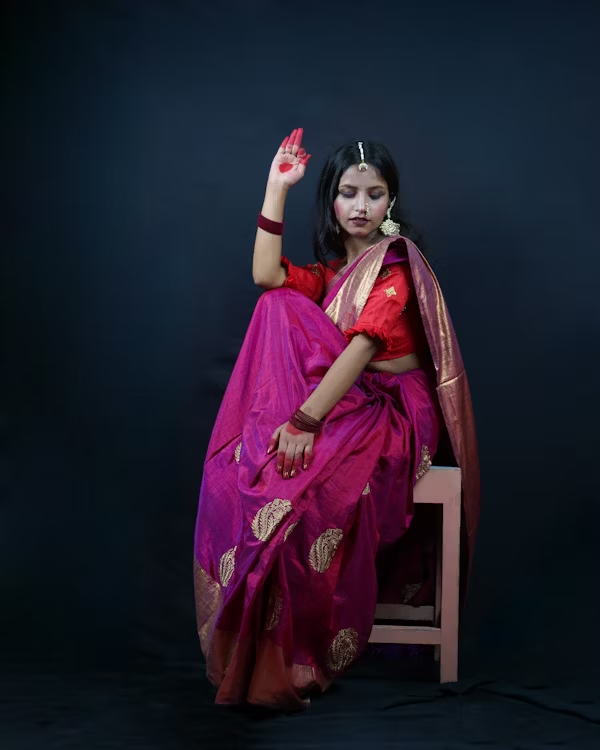
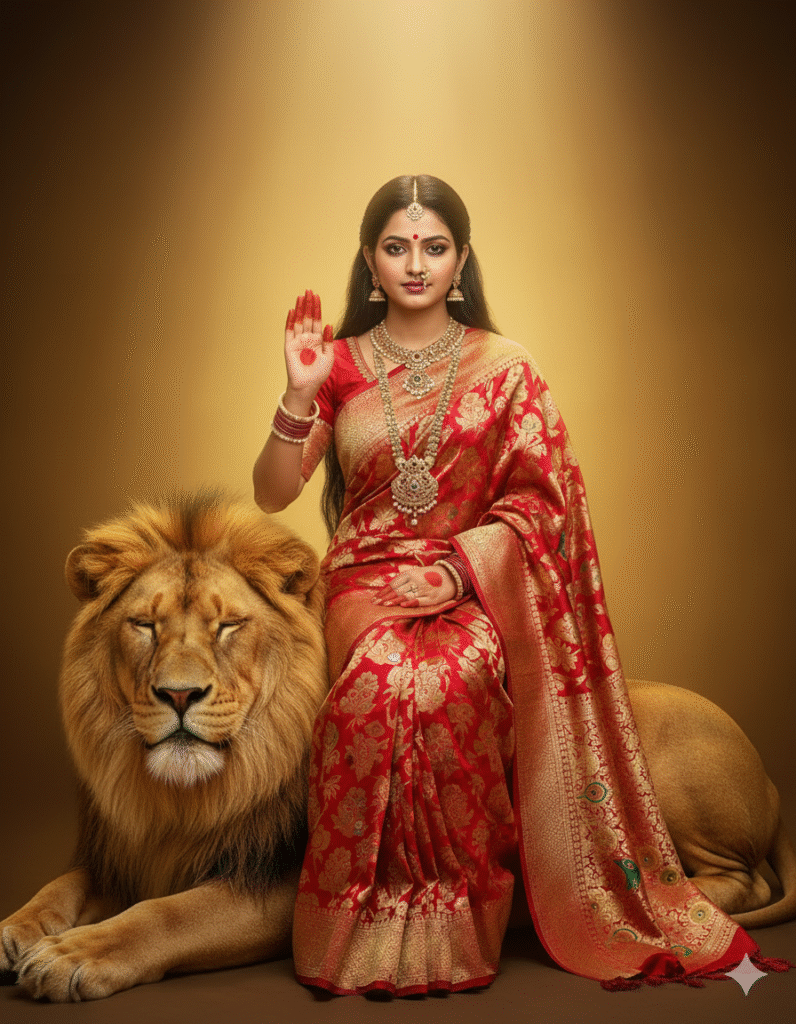
Prompt 2 – Peaceful Blessings (Dreamy, 4K)
Convert the uploaded reference into a dreamlike portrait of Durga Mata blessing devotees. She wears a solid-coloured saree in red or orange with subtle patterns. Her expression is gentle and loving. Add glowing aura around her head, soft lighting, and floating particles in the background. The final image should be highly detailed, with Pinterest-like aesthetic and hyper-realistic textures. Include floral elements and soft clouds for added depth.
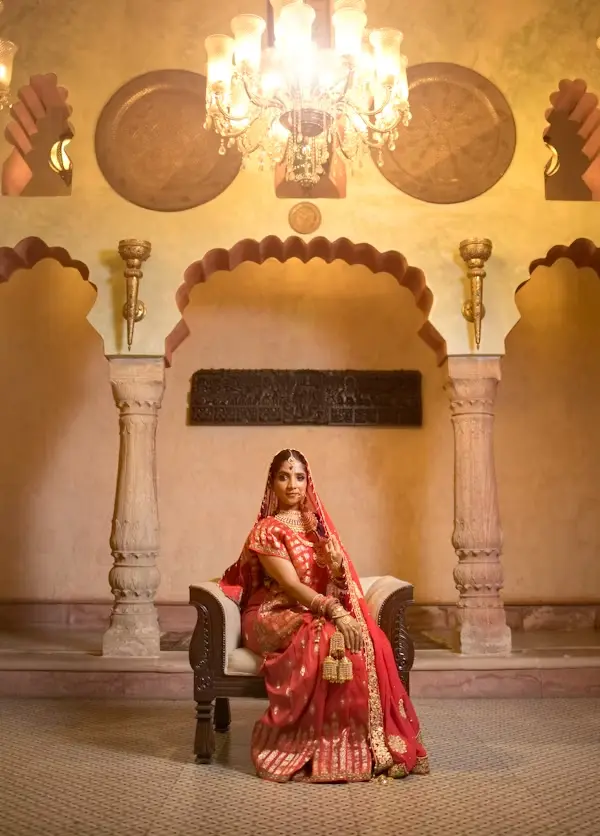
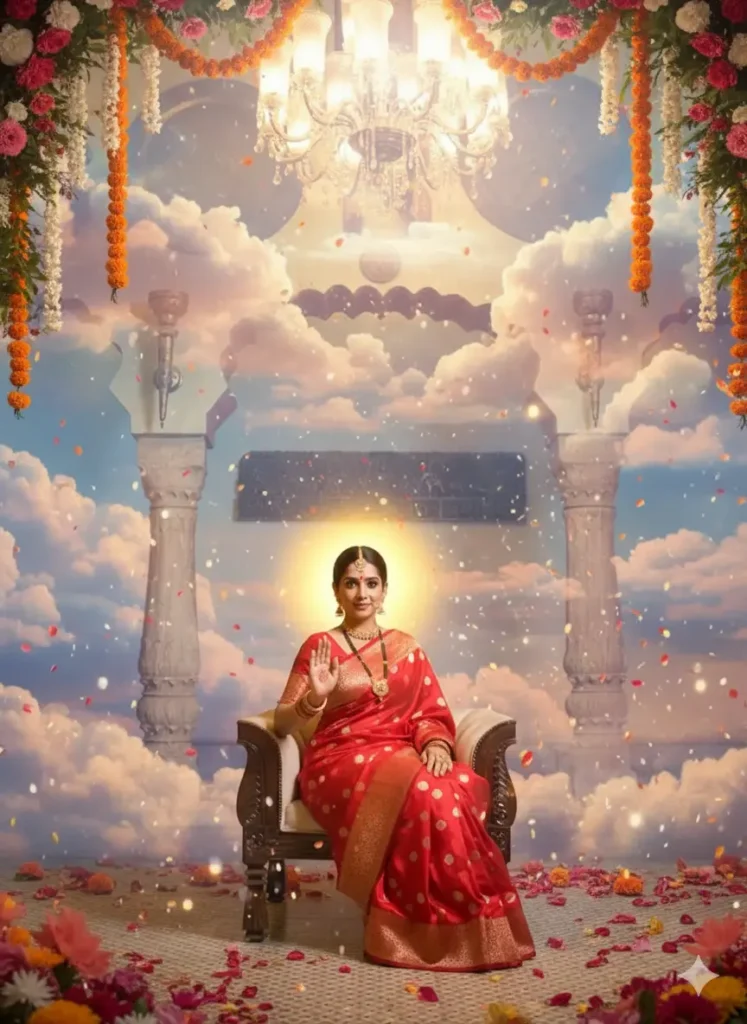
Prompt 3 – Nighttime Divine Glow (4K)
Use the reference image to create a hyper-realistic night scene of Durga Mata. She is seated on a lion near a riverbank under a full moon. Moonlight reflects on the water, highlighting her glowing face and golden ornaments. Colors are rich and vivid, with intricate details in clothing, jewelry, and facial expressions. The overall atmosphere should feel serene, divine, and mystical, with cinematic lighting and high-resolution 4K quality.
Read More: Nano Banana Photoshop Plugin: Is Free Download Safe? Risks!!
Prompt 4 – Festival Celebration (Vibrant, 4K)
Create an ultra-realistic festival scene featuring Durga Mata in a dynamic pose, dancing or blessing devotees. She wears a vibrant, festive saree with gold embroidery. The background is full of colors, lights, and energetic movement. Include glowing particles, fireworks, and floating petals to enhance the celebratory atmosphere. The image should be 4K, highly detailed, with cinematic depth, 3D/4D/5D variations for a surreal yet realistic look.
Prompt 5 – Action Scene (Epic Battle, 4K)
Transform the uploaded reference picture into an epic action scene of Durga Mata fighting Mahishasura. She is standing on a lion, her saree flowing dynamically, weapons in hand. The scene is energetic, with explosions of light and cosmic energy around her. Background includes stormy clouds, mystical fire, and divine sparks. The final image is in 4K with a hyper-detailed, cinematic, and surreal look.

Sia is the co-founder of Corenexis and one of the earliest voices shaping its editorial direction. With years of hands-on experience covering AI and technology, she has been writing about the digital world long before it became everyone's favorite topic — and she still does it better than most.
View all posts by Sia →
10 Comments
I like how you broke down the process into simple steps—it makes experimenting with different styles and moods much easier. The tip about using terms like ‘golden glow’ or ‘divine aura’ for lighting is especially helpful, since those subtle details can completely transform the spiritual feel of the artwork.
<p>I’m glad you found the breakdown helpful! You’re absolutely right—small details like lighting terms can really shift the mood and add that spiritual depth. Experimenting with those subtle tweaks often brings out the most powerful results.</p>
Great line up. We will be linking to this great article on our site. Keep up the good writing.
Can you be more specific about the content of your article? After reading it, I still have some doubts. Hope you can help me.
Thanks for the detailed guide on using Gemini AI to create Durga Mata art! I especially appreciated the breakdown of how different styles like 3D, 4D, and 5D/6D can bring a unique depth and cinematic feel to the artwork. It’s fascinating to see how AI can help bring such divine imagery to life while still allowing for creative customization.
I’ve been experimenting with the 5D and 6D styles, but I sometimes struggle to keep the traditional iconography consistent. Do you find that uploading a reference photo helps the AI maintain those specific details better, or does it sometimes limit the creative freedom of the prompt?
This detailed guide on using Gemini AI for creating Durga Mata art really highlights the platform’s versatility, especially with its support for multiple styles like 3D, 4D, and cinematic effects. It’s fascinating to see how users can blend traditional reverence with modern AI tools to bring divine imagery to life. The step-by-step approach makes it easy for both beginners and creative enthusiasts to explore their artistic potential.
This step-by-step breakdown on leveraging Gemini AI for hyper-realistic Durga Mata art is incredibly timely, especially the section on adjusting lighting and mood to create that divine golden glow. I appreciate the specific breakdown of styles like 5D and 6D for achieving such dynamic, cinematic effects without needing complex software. It’s fascinating how accessible these prompt engineering techniques are becoming for such spiritually significant imagery.
This step-by-step breakdown on leveraging Gemini AI for Durga Mata art is incredibly helpful, especially the distinction between 3D/4D realism and the surreal effects of 5D/6D styles. I particularly appreciate the tip about uploading a reference image to ground the divine figure while allowing for cinematic customization of the mood and lighting. It’s amazing to see how technology can be used to create such hyper-realistic and spiritually resonant visuals.
This step-by-step guide on using Gemini AI to generate Durga Mata art is incredibly helpful, especially the section on adjusting lighting and mood to achieve that divine golden glow. I appreciate how the article breaks down the different dimensions, from 3D realism to those epic 6D cinematic effects, as it really clarifies the creative possibilities for this medium. It’s fascinating to see how technology can be used to capture such spiritual imagery with such depth and detail.
Community guidelines
We want the comments to be useful for every reader. Every comment is reviewed before it is published. A comment will not be approved if it is:
Keep it genuine and on-topic and it will be approved quickly. Thank you for helping keep the discussion clean.