
Google AI Studio’s Vibe Coding Magic for Creators
Google AI Studio (also known as Gemini AI Studio) is a powerful AI development platform by Google where developers, students, and creators can interact with AI to build real-world tools and applications.
On this platform, you can write prompts, generate code, and test responses in a conversational way.
In simple words:
“Google AI Studio is a place where you can sit with AI and code together — like brainstorming with a smart partner.”
It runs on Gemini models (such as Gemini 1.5 Pro and Flash) that are capable of understanding both natural language and programming code.
The platform was officially launched on December 13, 2023, when Google introduced it alongside the Gemini API for public access.
Read Now: Comet AI Browser Perplexity – Next-Gen Browser
The New Trend: “Vibe Coding” and Its Popularity Among Developers
Now let’s talk about Vibe Coding — one of the most exciting and creative features inside Google AI Studio.
In traditional AI coding, you simply write a prompt and get an output.
But with Vibe Coding, you can tell the AI your coding mood or style, such as:
- “I want a chill vibe website.”
- “Create a professional-looking portfolio.”
- “Build a funny vibe login page.”
The AI then generates code, design suggestions, and even comments based on that vibe.
This allows both developers and designers to explore creativity and experimentation without repetitive manual trials.
When Did Vibe Coding Launch?
- The Vibe Coding feature was officially released on October 26, 2025, as part of Google’s Gemini AI Studio global update.
- The concept itself was first mentioned in February 2025 by AI researcher Andrej Karpathy, who described “vibe-based coding” as a new approach to collaborative, style-driven programming.
- After the October release, Google fully integrated it into Gemini Studio — enabling users to specify a project’s vibe and receive AI-generated outputs tailored to that style.
Since then, it has become extremely popular among developers and creators who want to combine design and functionality in a single, intelligent workflow.
A New Era of Creative Coding with AI in 2025
By 2025, coding is no longer just about logic — it has evolved into a mix of collaboration and creativity.
Google AI Studio’s Vibe Coding represents this new era where:
- The AI understands your preferred style,
- Suggests tone, layout, and design ideas, and
- Lets you test multiple “mood versions” of the same project.
Imagine creating one portfolio website in chill, techy, and playful styles — all generated by AI without writing a single line of CSS manually.
That’s why Vibe Coding has quickly gained attention among developers, students, and even content creators.
It marks a future where AI is not just a tool, but a creative coding partner.
Read Now: Sora 2 APK Mod Premium( 3.11.0) 2025: Latest Version Download & Features Guide
What Is Vibe Coding? (Meaning & Concept)
The Meaning of “Vibe”
The word “vibe” refers to the mood, tone, or overall style of something.
In the context of AI and coding, it means giving your project a specific personality or emotional feel — for example, calm, energetic, professional, or playful.
The Concept of Vibe Coding: Mood-Based AI Collaboration
Vibe Coding is a new way of working with AI where you don’t just tell it what to build — you also tell it how it should feel.
In other words, it’s a mood-based collaboration between humans and AI.
Instead of providing rigid technical commands, you describe your creative intention — and the AI adapts its code, tone, and design according to that mood.
It’s like having a designer and developer in one intelligent assistant who understands your desired vibe and translates it into functional, styled code.
How It’s Different from Traditional AI Coding
In traditional AI coding, you give a straightforward prompt like:
“Create a landing page using HTML and CSS.”
The AI will generate a standard layout with basic styling.
But in Vibe Coding, you can say:
“Create a landing page with a calm, chill vibe using smooth colors and soft animations.”
Now, the AI understands not only the technical part but also the emotional tone — producing a layout that visually and functionally matches that mood.
Example: “Chill Vibe” vs “Professional Vibe” Output
Let’s compare the difference in output between two vibes:
- Chill Vibe:
- Uses pastel or soft color palettes
- Rounded buttons, smooth transitions
- Relaxed, friendly text tone
- Minimal shadows and gentle animations
- Professional Vibe:
- Uses clean lines, neutral colors, and structured grids
- Sharp buttons, clear typography
- Formal, concise text tone
- Subtle transitions for a polished look
So, with just one word — vibe — you can change the entire look, feel, and mood of your project.
That’s the power of Vibe Coding: AI that codes with personality.
The Role of Vibe Coding in Google AI Studio
Google AI Studio, also known as Gemini Studio, is Google’s web-based environment where developers and creators can build, test, and deploy AI-powered applications.
It provides direct access to Gemini models — advanced AI systems capable of understanding text, code, and design patterns.
Within this platform, users can experiment with prompts, generate prototypes, and instantly preview how AI interprets their instructions.
How Vibe Coding Is Integrated into the System
Vibe Coding is not a separate tool — it’s deeply integrated into Google AI Studio’s prompt system.
When writing a prompt, you can include a desired mood or tone alongside your technical instructions.
The AI then uses that emotional context to shape the generated code, layout, and even the textual content it produces.
For example, if you type:
“Create a landing page in a calm, relaxing vibe.”
The system will automatically adjust its color scheme, typography, and structure to reflect that mood — without needing extra CSS or design edits.
Essentially, Google AI Studio merges coding and creativity by allowing users to guide not just the functionality but also the feeling of their project.
The “Prompt + Mood” Concept
At the heart of Vibe Coding is the Prompt + Mood concept.
This means your input is divided into two layers:
- Prompt (What to Build): The technical request — e.g., “Build a login page using HTML and CSS.”
- Mood (How It Should Feel): The stylistic or emotional direction — e.g., “Make it look minimal, modern, and confident.”
By combining both, the AI understands your intent and style together — leading to outputs that look and feel closer to your creative vision.
Why It’s Useful for Both Developers and Designers
- For Developers:
Vibe Coding speeds up UI/UX development, eliminates repetitive design tweaks, and helps prototype different versions of the same project quickly. - For Designers:
It’s an intuitive way to express artistic direction using natural language, without needing deep coding skills. Designers can focus on mood and creativity, while AI handles the implementation.
In short, Vibe Coding bridges the gap between design and development, giving both sides a shared creative language inside Google AI Studio.
How to Access and Use Vibe Coding (Step-by-Step Guide)
Getting started with Vibe Coding in Google AI Studio is simple. Follow these steps to explore how it works and create your first vibe-based project:
Step 1: Open the Google AI Studio Website
Go to https://ai.google.dev in your browser.
This is Google’s official platform for working with Gemini models and AI-powered coding tools.
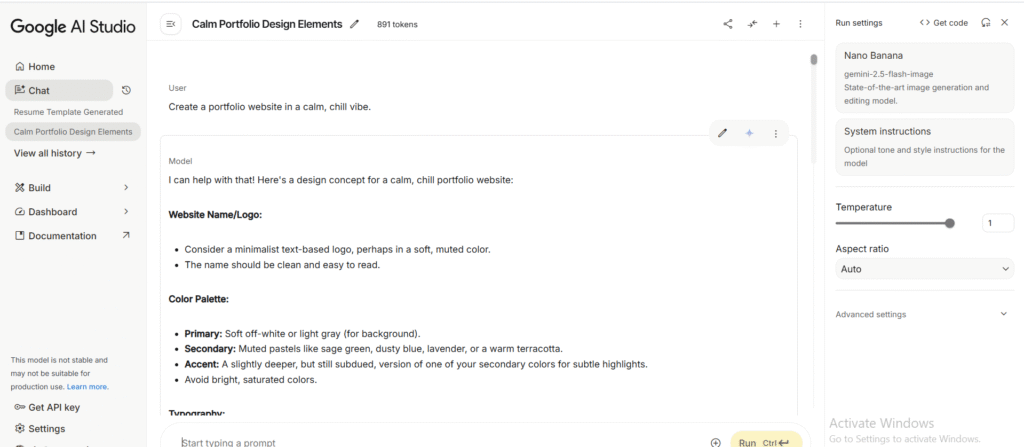
Step 2: Sign In with Your Google Account
Click “Sign In” and log in using your Google account.
You’ll need an active Google ID to access the Gemini workspace and save your projects.
Step 3: Create a New Prompt
Once you’re on the dashboard, click “Create New Prompt.”
This opens a text editor where you can enter your instructions for the AI.
Step 4: Specify Your Vibe
While writing your prompt, include the mood or style you want.
For example:
- “Design a landing page in a chill vibe.”
- “Generate a professional-looking resume template.”
- “Create a playful mobile app layout.”
The AI will interpret your technical request and the specified mood to deliver a matching output.
Step 5: Review the Output’s Tone and Design
After submission, the AI will generate your code or design preview.
Look closely at the tone, color scheme, and layout — they’ll align with the vibe you mentioned.
Step 6: Tweak or Export the Results
You can refine the results by re-prompting the AI (e.g., “Make it a bit more minimal” or “Add subtle animations”).
Once you’re satisfied, you can copy the code, download assets, or export the design directly from the workspace.
With these steps, you can easily start exploring mood-based coding inside Google AI Studio — blending creativity and functionality in a single workflow.
Major Features of Vibe Coding
Mood-based Output Generation
Vibe Coding lets you specify a mood or style in addition to technical requirements. The AI uses that mood to influence choices like color palette, spacing, typography, and interaction patterns so the generated output aligns with the intended emotional tone (for example, calm and soft vs bold and energetic).
Natural-Tone Explanations Alongside Code
When the AI generates code, it also produces human-readable explanations and comments written in the chosen tone. This makes the output easier to understand and review — beginners get friendly guidance, while seniors receive concise, professional notes.
Creative UI/UX Suggestions
Beyond raw HTML/CSS/JS, Vibe Coding offers design suggestions that match the specified vibe: layouts, component choices (cards, hero sections, navigation styles), micro-interactions, and simple accessibility tips. These recommendations help bridge the gap between design intent and implementation.
Multi-Style Experiments (Same Prompt, Different Vibes)
One prompt can produce multiple stylistic versions of the same project. By changing only the vibe parameter, you can quickly compare “chill”, “techy”, “minimal”, or “playful” variants. This accelerates A/B exploration, design reviews, and rapid prototyping.
Integrated Gemini AI Models
Vibe Coding runs on Google’s Gemini family of models, which can handle both natural language and code. Integration with Gemini means the system can reason about design plus implementation, enabling richer outputs (complete files, code snippets, and structured explanations) in a single response.
What You Can Create with Vibe Coding (Example Projects)
Vibe Coding isn’t limited to one type of project — it adapts to any creative idea you have. Whether you’re a developer, designer, or student, you can use it to instantly generate websites, app layouts, and interactive prototypes that reflect a specific mood or tone.
Below are some example ideas to inspire your readers:
1. “Chill Vibe” Portfolio Website
- Uses soft pastel colors, smooth scroll effects, and gentle transitions.
- Perfect for personal branding, artists, and freelance portfolios.
- Example prompt: “Create a personal portfolio website with a calm, chill vibe using rounded sections and soft animations.”
2. “Techy Vibe” Landing Page
- Features modern gradients, glowing buttons, and futuristic typography.
- Ideal for SaaS, startups, or AI-based product pages.
- Example prompt: “Design a landing page in a techy, futuristic vibe using neon gradients and sharp layouts.”
3. “Playful Vibe” App Design
- Includes emoji-style icons, bright color palettes, and bouncy animations.
- Great for kids’ apps, fun tools, or gamified learning projects.
- Example prompt: “Build a fun app homepage in a playful vibe with emoji buttons and interactive effects.”
4. “Minimal Vibe” Login Page
- Clean, distraction-free layout with plenty of white space.
- Focuses on clarity and usability — ideal for modern dashboards or SaaS apps.
- Example prompt: “Create a minimal login page with a white background, simple form, and smooth hover effects.”
5. “Professional Vibe” Resume Site
- Uses formal fonts, balanced spacing, and subtle hover transitions.
- Ideal for job seekers, consultants, or corporate portfolios.
- Example prompt: “Generate a professional resume website with a two-column layout and elegant typography.”
(Optional: You can later include screenshots, preview images, or code snippets for each example to make this section visually engaging.)
Benefits of Vibe Coding
Vibe Coding offers a mix of creativity, speed, and accessibility — making it one of the most exciting new approaches to AI-assisted development.
Creative and Learning-Friendly
It’s perfect for beginners and students who want to learn coding in a fun, interactive way. The AI not only writes code but also explains logic and styling choices in natural language.
Fast Prototyping for Web and App Ideas
You can quickly turn ideas into prototypes without spending hours on manual design or setup. It’s ideal for early-stage brainstorming and proof-of-concept projects.
Helpful for Non-Coders and Students
Even if you don’t have a programming background, you can describe what you want in plain English — and the AI converts it into working HTML, CSS, or JS code.
Best Way to Explore Different Styles
Developers can instantly compare multiple “moods” or “themes” for the same project — for example, testing a landing page in both “minimal” and “techy” styles.
Fun and Interactive AI Experience
Vibe Coding makes the process of building with AI feel like a creative collaboration rather than a technical task. It’s fast, conversational, and surprisingly engaging.
Pricing and Plans (Free vs Paid)
Free Plan
- Basic usage is completely free.
- Users can explore vibe-based prompts and simple coding tasks.
- Daily usage and model access may be limited depending on server load or region.
- Ideal for beginners, students, and light creative work.
Paid Plans
- Google AI Pro: Includes advanced features, priority access, and higher generation limits.
- Google AI Ultra: A top-tier plan for professionals and heavy users (around $249.99/month).
- For developers building full applications, Vertex AI (Google Cloud) offers a pay-as-you-go system with API-level control.
- Regional pricing may vary — in India, prices are shown in local currency (₹).
📎 Official pricing and updates: https://ai.google.dev
Limitations and Challenges
- Currently in an experimental stage (as of 2025) — not yet production-grade for enterprise apps.
- May struggle with complex, multi-page projects or large frameworks.
- Requires a stable internet connection and a Google account.
- Sometimes the AI’s vibe interpretation can be slightly off (e.g., confusing “minimal” with “modern”).
Despite these limitations, it’s evolving rapidly with each Gemini model update.
Best Practices and Tips for Better Results
- Always mention your mood clearly — e.g., “in a calm, chill vibe” or “in a futuristic, techy vibe.”
- Ask for structured output, such as “Provide HTML + CSS + JavaScript code blocks.”
- Tweak the code manually to match your personal design taste or brand identity.
- Experiment with multiple vibes for the same project to discover new creative directions.
Small changes in tone or description can produce dramatically different results — that’s the beauty of Vibe Coding.
The Future of Vibe Coding
- Continuous Gemini Model Updates: Each new Gemini version will bring smarter, more accurate vibe understanding.
- Integration with Developer Tools: Future updates may connect Vibe Coding directly with VS Code, Android Studio, or Google Cloud tools.
- Collaboration with Design Platforms: Possible integration with Figma, Canva, and other AI-powered design ecosystems for end-to-end creative workflows.
Vibe Coding is shaping a future where design, code, and creativity merge seamlessly.
Conclusion
Vibe Coding represents a new way to code — one driven by creativity, tone, and collaboration with AI.
It’s equally useful for beginners who want to learn through experimentation and professionals exploring new UI/UX directions.
If you haven’t tried it yet, visit Google AI Studio and test the free version —
you’ll see how coding can actually match your vibe.

Sia is the co-founder of Corenexis and one of the earliest voices shaping its editorial direction. With years of hands-on experience covering AI and technology, she has been writing about the digital world long before it became everyone's favorite topic — and she still does it better than most.
View all posts by Sia →


2 Comments
Can you be more specific about the content of your article? After reading it, I still have some doubts. Hope you can help me.
I don’t think the title of your article matches the content lol. Just kidding, mainly because I had some doubts after reading the article.
Community guidelines
We want the comments to be useful for every reader. Every comment is reviewed before it is published. A comment will not be approved if it is:
Keep it genuine and on-topic and it will be approved quickly. Thank you for helping keep the discussion clean.