
Nano Banana Google’s — The Funniest Name for the Smartest AI Tool
Google has always loved surprising us — sometimes with serious tech breakthroughs, sometimes with playful ideas. But this time, it did both at once. With just three banana emojis (🍌🍌🍌) on X, Google CEO Sundar Pichai had the entire tech world buzzing. People kept guessing: a new gadget? a hidden joke?
A few days later, the mystery was revealed. Those bananas were not about fruit at all — they were the teaser for “Nano Banana,” the quirky codename for Google’s newest AI image editing model, Gemini 2.5 Flash Image.
What Exactly Is Nano Banana?
Behind the funny name lies a serious piece of technology. Nano Banana is Google’s fastest and smartest AI image editing tool yet. Think of it as Photoshop, but instead of layers, brushes, and hours of learning, you just… type.
You write a prompt like:
- “Make the background a beach at sunset.”
- “Put a red jacket on the person.”
And in a few seconds, the photo changes. No skills, no hassle, just results.
The Official Launch
Nano Banana officially rolled out at the end of August 2025, first as a preview release. It’s already available through:
- The Gemini app (for everyday users),
- Google AI Studio (for experimenting),
- Gemini API & Vertex AI (for developers and businesses).
The launch wasn’t just a software update — it was a statement. Google showed the world that advanced image editing doesn’t need to stay locked inside complicated professional tools.
What Makes Nano Banana Special?
Here’s why people are calling it an “Instant Photoshop”:
- Text-based magic: Type instructions, get edits.
- Object removal: Got a photobomber? Gone in seconds.
- Image fusion: Combine two photos into one natural-looking image.
- Face consistency: Keeps people recognizable, no weird distortions.
- Transparency: Every AI-generated photo carries Google’s invisible SynthID watermark to prevent misuse.
Why Everyone’s Talking About It
Since its launch, Nano Banana has gone viral. Social media is full of hilarious celebrity mashups, dreamy landscapes, and fun edits that look surprisingly real.
But it’s not just for jokes. Creators and businesses are already seeing the potential:
- YouTubers can design thumbnails faster,
- Brands can create product shots without a full photoshoot,
- Everyday users can finally edit photos without opening Photoshop tutorials.
Not All Fun and Games
Of course, there’s a serious side too. With great editing power comes great responsibility:
- Deepfake risks: The same realism that makes edits amazing can also be misused.
- Not a full Photoshop killer (yet): Professionals still need advanced tools.
- Ethical use matters: Google built in watermarks, but human responsibility is key.
A Glimpse Into the Future
Nano Banana is more than a viral AI tool — it’s a glimpse of where digital creativity is heading. Imagine a world where editing photos is as easy as sending a text message. That’s the world Google is building.
It won’t replace designers or photographers, but it will empower millions of people who just want to create, experiment, and have fun with their images.
How to Merge Two Photos with Google Nano Banana (Example Explained)
We’ve already learned what Nano Banana (Google’s Gemini 2.5 Flash Image model) is and how it works. Now, let’s make it practical. To really understand its power, let’s walk through a real example.
The Photos We Have
Imagine you have two separate pictures:
- A woman sitting outdoors on a wooden bridge.
- A cat relaxing indoors.
On their own, they’re nice photos. But wouldn’t it be fun (and useful) if we could bring them together into one single, natural-looking image? That’s exactly what Nano Banana can do.
Step-by-Step Editing with Nano Banana
Here’s how you’d guide Nano Banana using text prompts:
Step 1: Choose the Base Image
We tell the AI which picture to use as the background.
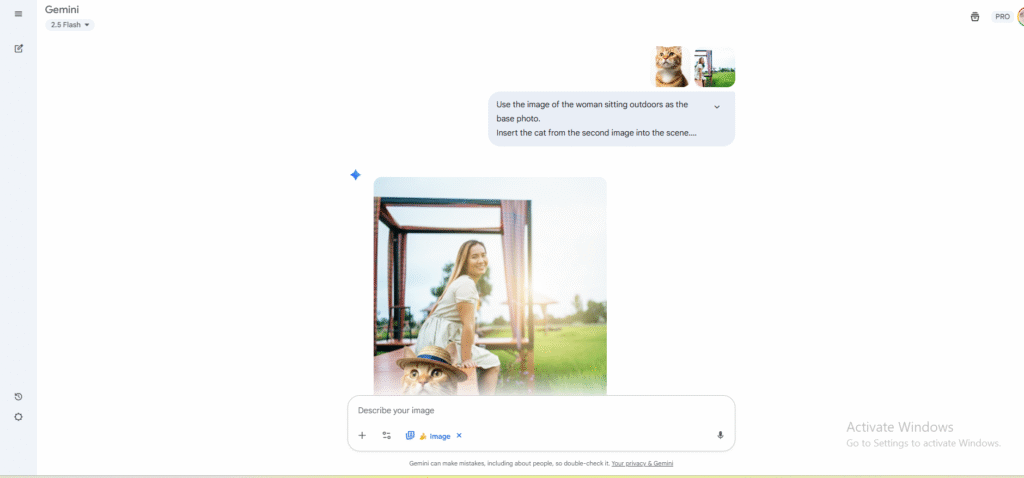
👉 Prompt:Use the image of the woman sitting outdoors as the base photo.

This makes the outdoor bridge scene the foundation of our final picture.
Step 2: Add the Second Image
Next, we bring the cat into the scene.
👉 Prompt:Insert the cat from the second image into the scene.
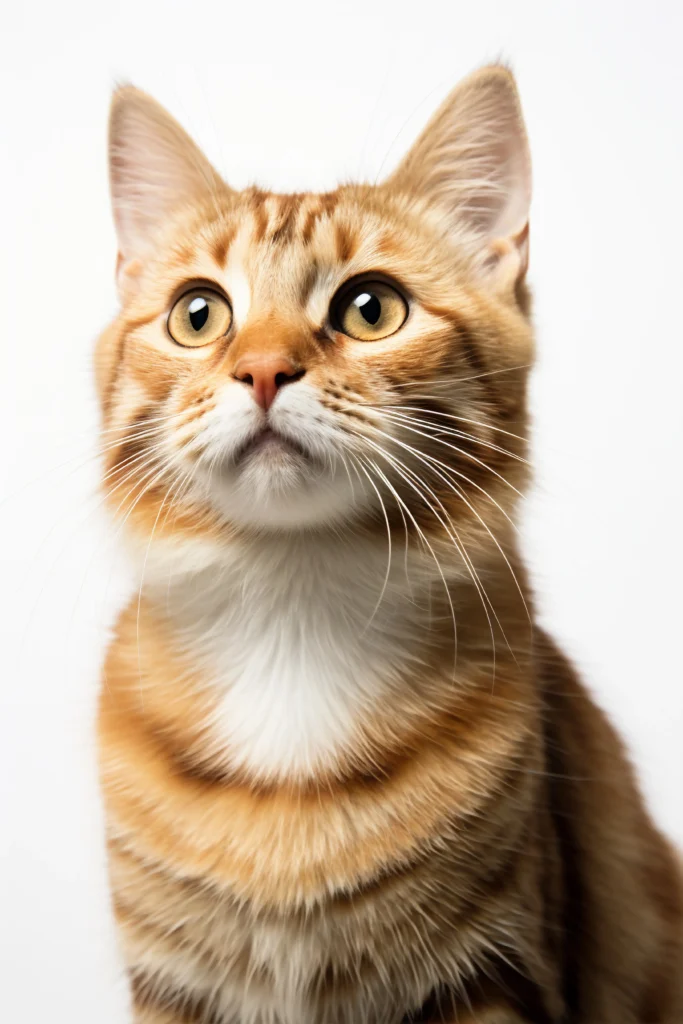
Now Nano Banana knows to cut the cat out from the indoor photo and prepare it to fit into the outdoor setting.
Step 3: Position the Cat
We decide where the cat should sit.
👉 Prompt:Place the cat sitting next to the woman on the wooden bridge.
This gives the impression of companionship — the woman and her cat relaxing together
Step 4: Match Lighting & Shadows
To make the edit believable, the lighting has to look natural.
👉 Prompt:Adjust the lighting and shadows of the cat so it matches the outdoor light of the scene.
This step removes the “cut and paste” feeling and blends the two images realistically.
Step 5: Blend Smoothly
Finally, we ask the AI to refine the details.
👉 Prompt:Blend both images smoothly so the final picture looks natural and not artificially edited.
At this point, the AI cleans up edges, textures, and tones so the cat looks like it was always part of the original photo.
Optional Creative Touches
Once the basic merge is done, you can play with creativity:
- Add a cute hat on the cat:
Make the cat wear a small red hat. - Change the time of day:
Add a warm sunset glow in the background. - Decorate with flowers:
Place some colorful flowers around the wooden bridge.

With just words, you can transform the mood, style, and story of the picture.
Quick Recap
| Feature | Why It Matters |
|---|---|
| Codename | Nano Banana |
| Model Name | Gemini 2.5 Flash Image |
| Launch | End of August 2025 |
| Platforms | Gemini App, AI Studio, API, Vertex AI |
| Highlights | Fast edits, object removal, image fusion, face consistency |
| Buzz | Viral as “Instant Photoshop” |
Final Thoughts
At first, people laughed at the name. But now, nobody’s laughing at what Nano Banana can do. It’s fast, fun, and powerful — and it puts advanced photo editing in the hands of everyday people.
Google took a funny codename and turned it into one of the most exciting AI launches of 2025.

Sia is the co-founder of Corenexis and one of the earliest voices shaping its editorial direction. With years of hands-on experience covering AI and technology, she has been writing about the digital world long before it became everyone's favorite topic — and she still does it better than most.
View all posts by Sia →


3 Comments
For latest information you have to pay a visit internet and on world-wide-web I found this site as a best web page for hottest updates.
I enjoy your work, regards for all the great blog posts.
Your article helped me a lot, is there any more related content? Thanks!
Community guidelines
We want the comments to be useful for every reader. Every comment is reviewed before it is published. A comment will not be approved if it is:
Keep it genuine and on-topic and it will be approved quickly. Thank you for helping keep the discussion clean.